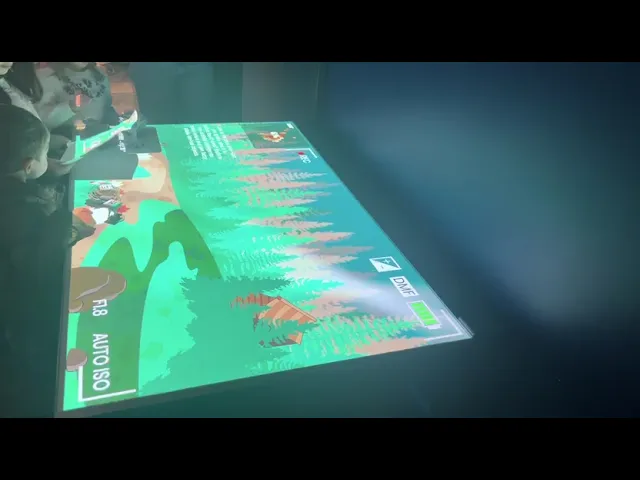
AI Spy With My Little Eye @Boston Museum of Science
Interactive table-top game at Boston Museum of Science
Summary

Quick Facts
Team Members: Shawki Izzat, Diana Chalakova, Tsing Liu, Chenxing (Felix) Yu, Malik Jones
My Role(s): Project Manager, Content, and Design
Tools Used: Figma, Unity
Release: December 2025
Timeline: 4 months
Description
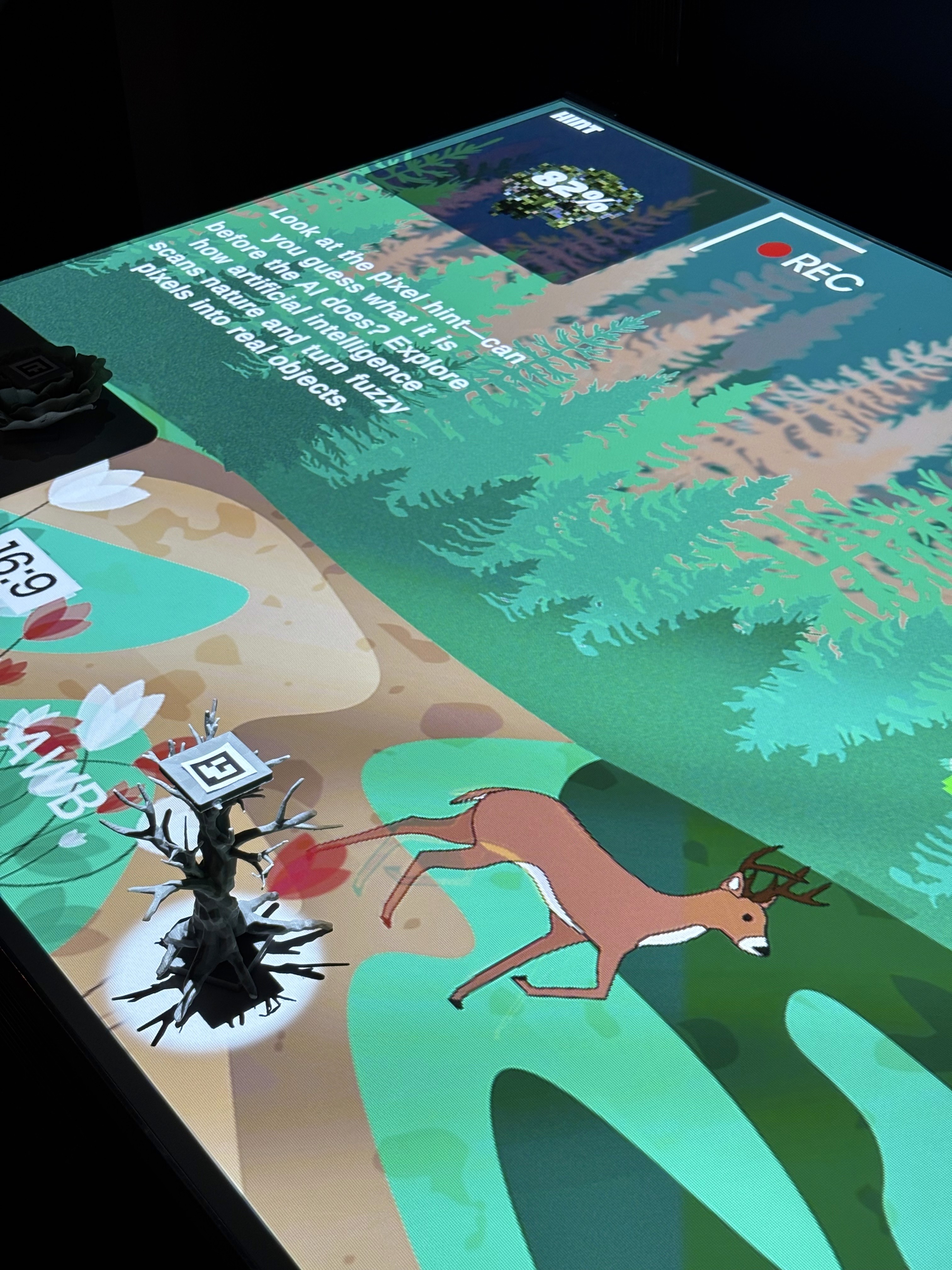
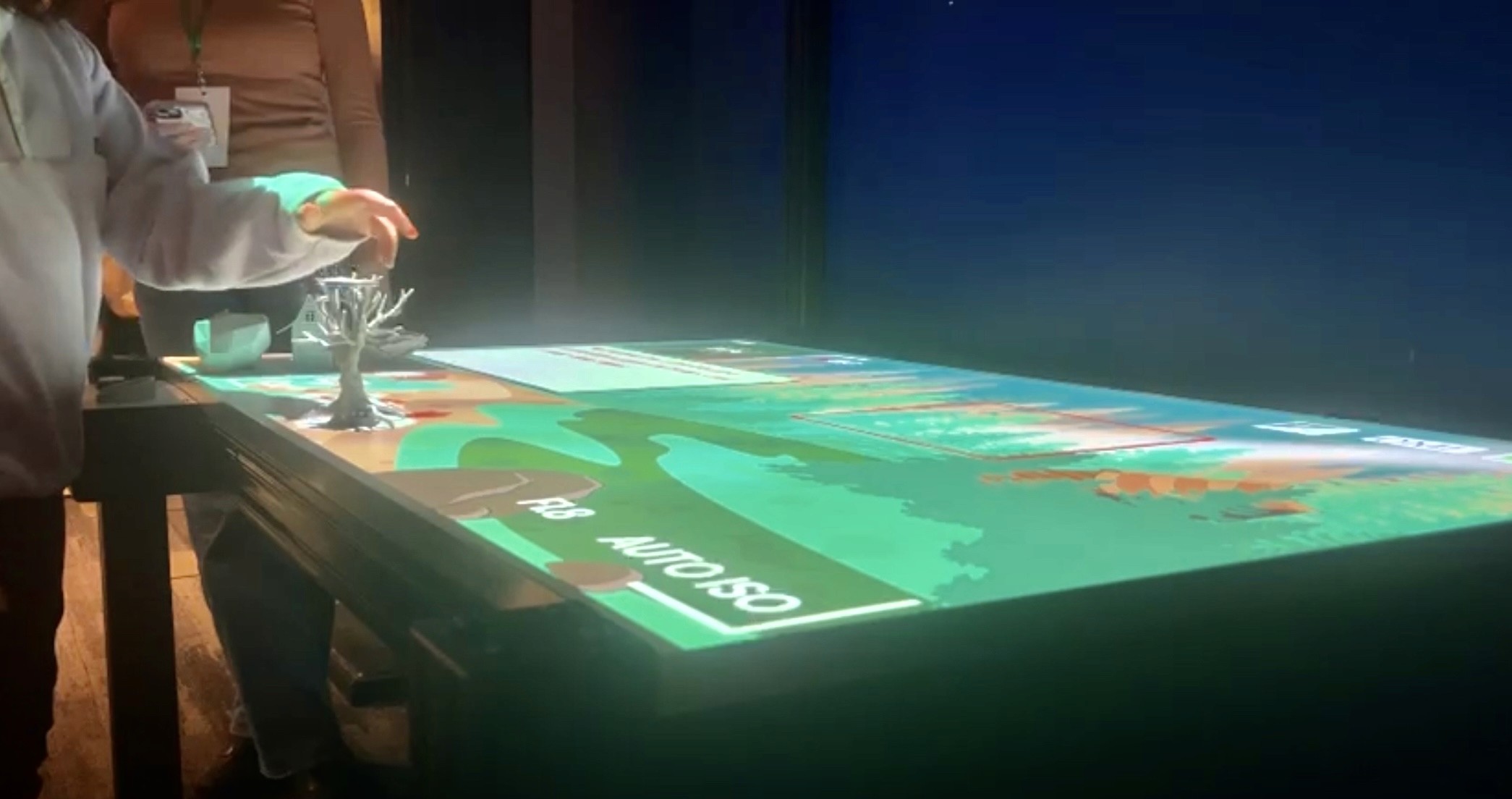
As part of a playtesting exhibition for visitors at the Boston Museum of Science, we built an interactive table-top game that puts the user in the role of AI identifying objects in a nature scene.
Instead of using verbal prompts, we have visual prompts as pixelated images that slowly become clearer. Users must place the corresponding 3D puck on the scanner to identify it before time runs out.
Quick Facts
Team Members: Shawki Izzat, Diana Chalakova, Tsing Liu, Chenxing (Felix) Yu, Malik Jones
My Role(s): Project Manager, Content, and Design
Tools Used: Figma, Unity
Release: December 2025
Timeline: 4 months
Description
As part of a playtesting exhibition for visitors at the Boston Museum of Science, we built an interactive table-top game that puts the user in the role of AI identifying objects in a nature scene.
Instead of using verbal prompts, we have visual prompts as pixelated images that slowly become clearer. Users must place the corresponding 3D puck on the scanner to identify it before time runs out.
Quick Facts
Team Members: Shawki Izzat, Diana Chalakova, Tsing Liu, Chenxing (Felix) Yu, Malik Jones
My Role(s): Project Manager, Content, and Design
Tools Used: Figma, Unity
Release: December 2025
Timeline: 4 months
Description
As part of a playtesting exhibition for visitors at the Boston Museum of Science, we built an interactive table-top game that puts the user in the role of AI identifying objects in a nature scene.
Instead of using verbal prompts, we have visual prompts as pixelated images that slowly become clearer. Users must place the corresponding 3D puck on the scanner to identify it before time runs out.
Motivation
We wanted to lean into the concept of “productive struggle”. By playing, users would see how hard it can be for AI to identify objects, as AI systems use patterns, colors, and shapes to make educated guesses about what they see. Just like humans, AI can get confused when objects look similar or when clues are vague.
The broader message for our target users, predominately adolescent children, would be educating them on why training data is so important in machine learning. When AI misidentifies objects, it can affect real people, from selfdriving cars mistaking shadows for obstacles to photo apps mislabeling faces. Every mistake teaches AI, and us, something about how we perceive the world.
We wanted to lean into the concept of “productive struggle”. By playing, users would see how hard it can be for AI to identify objects, as AI systems use patterns, colors, and shapes to make educated guesses about what they see. Just like humans, AI can get confused when objects look similar or when clues are vague.
The broader message for our target users, predominately adolescent children, would be educating them on why training data is so important in machine learning. When AI misidentifies objects, it can affect real people, from selfdriving cars mistaking shadows for obstacles to photo apps mislabeling faces. Every mistake teaches AI, and us, something about how we perceive the world.
We wanted to lean into the concept of “productive struggle”. By playing, users would see how hard it can be for AI to identify objects, as AI systems use patterns, colors, and shapes to make educated guesses about what they see. Just like humans, AI can get confused when objects look similar or when clues are vague.
The broader message for our target users, predominately adolescent children, would be educating them on why training data is so important in machine learning. When AI misidentifies objects, it can affect real people, from selfdriving cars mistaking shadows for obstacles to photo apps mislabeling faces. Every mistake teaches AI, and us, something about how we perceive the world.
How it works
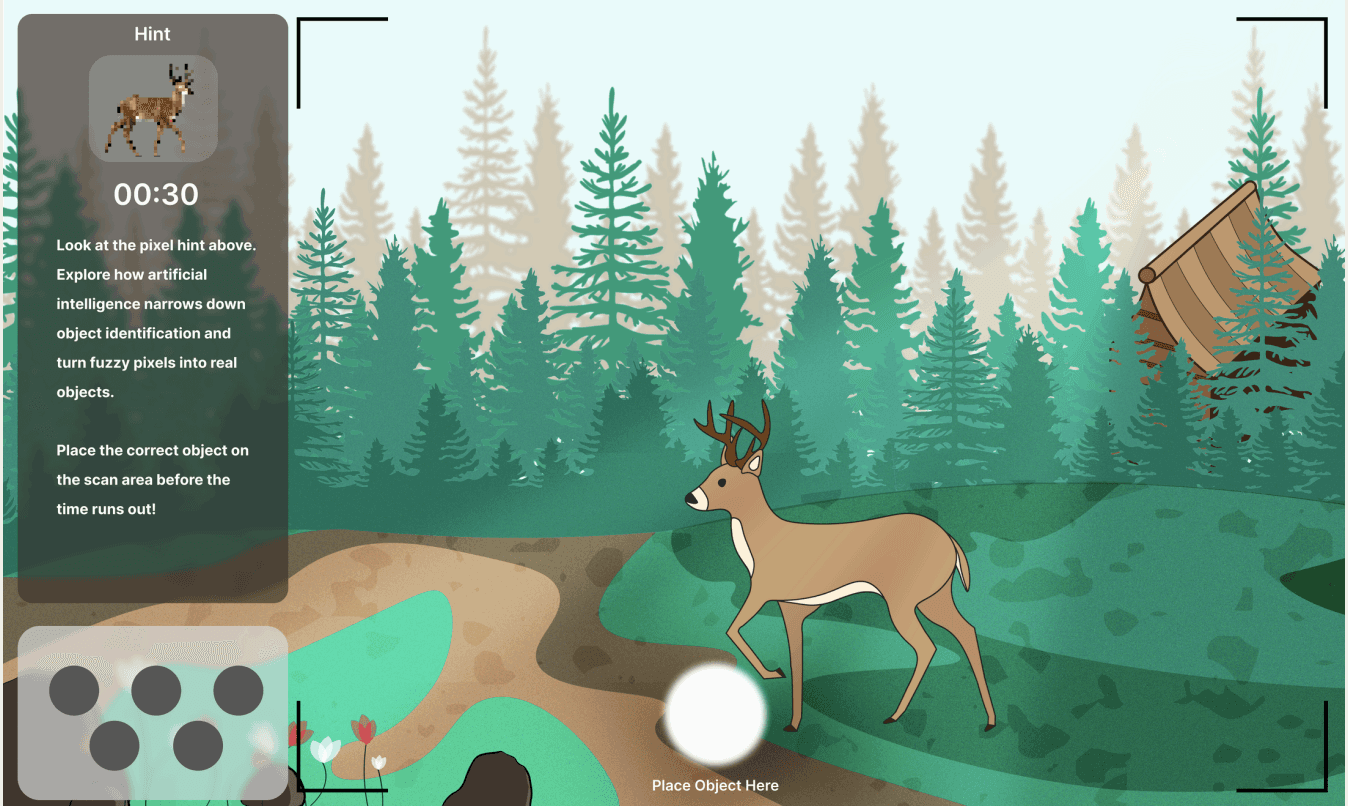
The round begins with a pixelated visual prompt on the top left, which is a hint to an object in the frame that is to be detected. Each hint corresponds to one of the five pucks that the user needs to place on the detection area. As the 30 second timer reduces, the visual prompt gets less pixelated, showing a more clear image of what the correct object is supposed to be. Based on which puck is placed on the detection area, a correct/incorrect message pops up with a brief explanation. Once the timer / guess is made, the round concludes, and a new round begins with a new visual prompt hint.
For example: A pixelated visual prompt that is long and pointy could correspond to either a deer's antlers or the branches of a tree. Based on the correct puck placed, the user gets it right or wrong.
The round begins with a pixelated visual prompt on the top left, which is a hint to an object in the frame that is to be detected. Each hint corresponds to one of the five pucks that the user needs to place on the detection area. As the 30 second timer reduces, the visual prompt gets less pixelated, showing a more clear image of what the correct object is supposed to be. Based on which puck is placed on the detection area, a correct/incorrect message pops up with a brief explanation. Once the timer / guess is made, the round concludes, and a new round begins with a new visual prompt hint.
For example: A pixelated visual prompt that is long and pointy could correspond to either a deer's antlers or the branches of a tree. Based on the correct puck placed, the user gets it right or wrong.
The round begins with a pixelated visual prompt on the top left, which is a hint to an object in the frame that is to be detected. Each hint corresponds to one of the five pucks that the user needs to place on the detection area. As the 30 second timer reduces, the visual prompt gets less pixelated, showing a more clear image of what the correct object is supposed to be. Based on which puck is placed on the detection area, a correct/incorrect message pops up with a brief explanation. Once the timer / guess is made, the round concludes, and a new round begins with a new visual prompt hint.
For example: A pixelated visual prompt that is long and pointy could correspond to either a deer's antlers or the branches of a tree. Based on the correct puck placed, the user gets it right or wrong.
Test Footage
Results
Pixelation
Visual prompts rather than written prompts should be maintained as they are engaging and resonate with users. The level of pixelation also hits our goal of “productive struggle” , as users couldn’t immediately figure out what the object was (only 2/9 comments on pixelation viewed it as detrimental to the project). The pixelation should be changed to fully de-pixelate when it reaches 100% though. and recover from errors.
Children & AI
All young children under the age of 10 years old didn’t know what AI was. Although this eliminates the AI learning experience, it could prompt at-home conversations between children and their parents about AI and in the meantime act as a simple trail camera guessing game that could still be educational in its own right.
Out of 15 Participants
76% of users found the experience to be interesting.
72% of users found it to be easy to use.
26.7% of users learned something new about AI.
Pixelation
Visual prompts rather than written prompts should be maintained as they are engaging and resonate with users. The level of pixelation also hits our goal of “productive struggle” , as users couldn’t immediately figure out what the object was (only 2/9 comments on pixelation viewed it as detrimental to the project). The pixelation should be changed to fully de-pixelate when it reaches 100% though. and recover from errors.
Children & AI
All young children under the age of 10 years old didn’t know what AI was. Although this eliminates the AI learning experience, it could prompt at-home conversations between children and their parents about AI and in the meantime act as a simple trail camera guessing game that could still be educational in its own right.
Out of 15 Participants
76% of users found the experience to be interesting.
72% of users found it to be easy to use.
26.7% of users learned something new about AI.
Pixelation
Visual prompts rather than written prompts should be maintained as they are engaging and resonate with users. The level of pixelation also hits our goal of “productive struggle” , as users couldn’t immediately figure out what the object was (only 2/9 comments on pixelation viewed it as detrimental to the project). The pixelation should be changed to fully de-pixelate when it reaches 100% though. and recover from errors.
Children & AI
All young children under the age of 10 years old didn’t know what AI was. Although this eliminates the AI learning experience, it could prompt at-home conversations between children and their parents about AI and in the meantime act as a simple trail camera guessing game that could still be educational in its own right.
Out of 15 Participants
76% of users found the experience to be interesting.
72% of users found it to be easy to use.
26.7% of users learned something new about AI.
Next Steps
System Feedback
Users didn’t have time to read the messages that would popup based on their right or wrong answer and the time between object hints needs a pause, as it’s not clear whether users can select a second object before the time runs out or not.
Scanner Time
The time for an object to scan while the timer is running provides an undesirable time crunch to the experience, with the latency (or lack thereof) of all of the above is a massive pain point. However, the time to scan length should still be kept allowing for error prevention to continue, but the timer should pause while the object is being scan.
Minimalist Design
The design of the camera lens has some added quirks that distract a bit and mildly violate the heuristic of aesthetic and minimalist design, which should be improved by removing some of the camera details and redesigning the sidebar (which would include the layout and typography).
Audio Issues
Especially because a lot of the museum’s demographic is a lot younger (and therefore, shorter), they either don’t know how to read or can’t see the top of the table. So, the sound for the tabletop experience needs to be fixed so the written text is read aloud and more inclusive.
System Feedback
Users didn’t have time to read the messages that would popup based on their right or wrong answer and the time between object hints needs a pause, as it’s not clear whether users can select a second object before the time runs out or not.
Scanner Time
The time for an object to scan while the timer is running provides an undesirable time crunch to the experience, with the latency (or lack thereof) of all of the above is a massive pain point. However, the time to scan length should still be kept allowing for error prevention to continue, but the timer should pause while the object is being scan.
Minimalist Design
The design of the camera lens has some added quirks that distract a bit and mildly violate the heuristic of aesthetic and minimalist design, which should be improved by removing some of the camera details and redesigning the sidebar (which would include the layout and typography).
Audio Issues
Especially because a lot of the museum’s demographic is a lot younger (and therefore, shorter), they either don’t know how to read or can’t see the top of the table. So, the sound for the tabletop experience needs to be fixed so the written text is read aloud and more inclusive.
System Feedback
Users didn’t have time to read the messages that would popup based on their right or wrong answer and the time between object hints needs a pause, as it’s not clear whether users can select a second object before the time runs out or not.
Scanner Time
The time for an object to scan while the timer is running provides an undesirable time crunch to the experience, with the latency (or lack thereof) of all of the above is a massive pain point. However, the time to scan length should still be kept allowing for error prevention to continue, but the timer should pause while the object is being scan.
Minimalist Design
The design of the camera lens has some added quirks that distract a bit and mildly violate the heuristic of aesthetic and minimalist design, which should be improved by removing some of the camera details and redesigning the sidebar (which would include the layout and typography).
Audio Issues
Especially because a lot of the museum’s demographic is a lot younger (and therefore, shorter), they either don’t know how to read or can’t see the top of the table. So, the sound for the tabletop experience needs to be fixed so the written text is read aloud and more inclusive.
Reflection
Collaborating with the Boston Museum of Science has been one of the most meaningful experiences of my time at Parsons School of Design. Working alongside a diverse group of designers and engineers to develop a project that was not only conceptualized but also tested in a real museum environment fundamentally shifted how I understand design. Engaging with real visitors and receiving direct, unfiltered feedback underscored the value of designing for people rather than assumptions. For the first time, museums didn’t feel distant or static to me—they felt alive, participatory, and deeply engaging.
Collaborating with the Boston Museum of Science has been one of the most meaningful experiences of my time at Parsons School of Design. Working alongside a diverse group of designers and engineers to develop a project that was not only conceptualized but also tested in a real museum environment fundamentally shifted how I understand design. Engaging with real visitors and receiving direct, unfiltered feedback underscored the value of designing for people rather than assumptions. For the first time, museums didn’t feel distant or static to me—they felt alive, participatory, and deeply engaging.
Collaborating with the Boston Museum of Science has been one of the most meaningful experiences of my time at Parsons School of Design. Working alongside a diverse group of designers and engineers to develop a project that was not only conceptualized but also tested in a real museum environment fundamentally shifted how I understand design. Engaging with real visitors and receiving direct, unfiltered feedback underscored the value of designing for people rather than assumptions. For the first time, museums didn’t feel distant or static to me—they felt alive, participatory, and deeply engaging.